What Is a POS System for Restaurants?
See what a restaurant POS system does, how tableside payment works, and what to look for beyond basic order and payment processing.
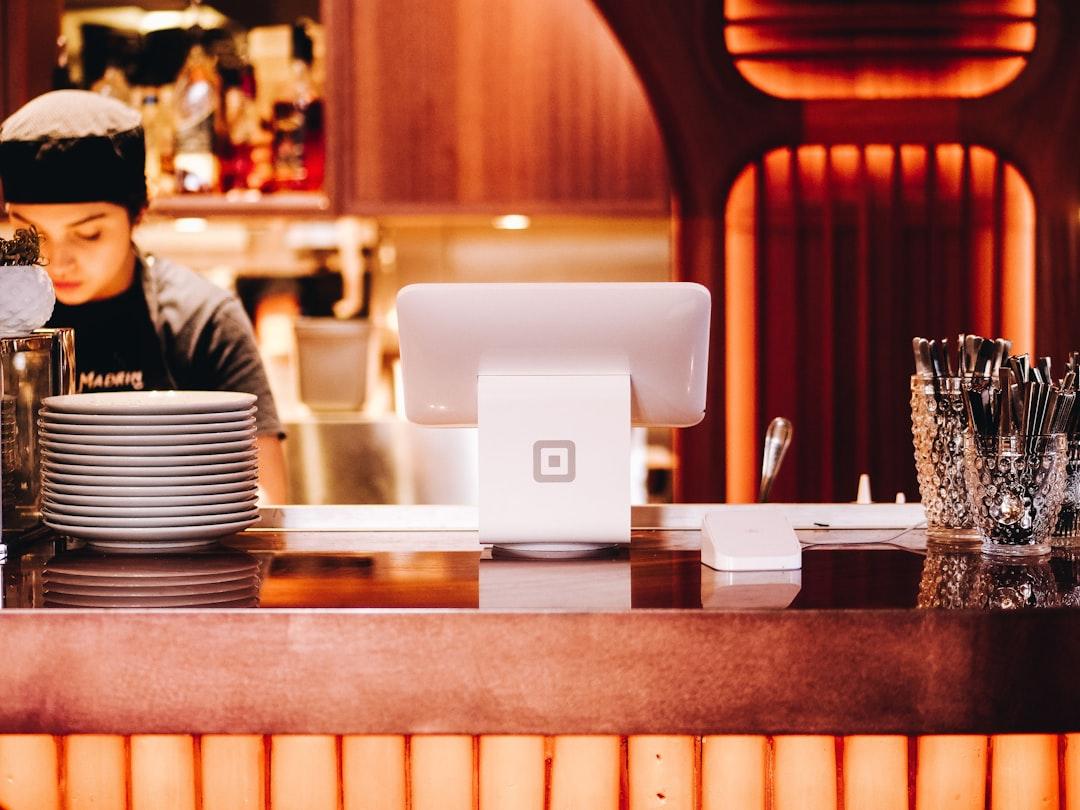
A restaurant POS system is hardware and software that handles order entry, payment processing, and kitchen communication from one connected setup, replacing separate registers, card terminals, and handwritten tickets. Paymetrics builds POS systems for restaurants that combine all three into a single account instead of three disconnected tools.
What Does a Restaurant POS System Do?
A restaurant POS handles four core jobs.
- Takes orders at the counter, tableside, or through a self-service kiosk
- Routes tickets straight to the kitchen display or printer
- Processes chip, tap, and swipe payments at the table or register
- Splits checks, applies discounts, and tracks tips automatically
Each job used to require a separate device. A modern restaurant POS runs all four from the same terminal or handheld. Restaurants running all four functions from one system report meaningfully fewer order errors than restaurants juggling a separate register, card terminal, and paper ticket rail.
How Does Tableside Payment Work?
Tableside payment lets a server bring a handheld mobile payments device to the table instead of walking a card back to a fixed terminal. The customer sees the charge, taps or inserts their card, and signs or taps to approve without the card leaving their hand. This same handheld also covers patio and rooftop seating that sits outside easy reach of a fixed terminal.
Does a Restaurant Still Need a Full Terminal?
Yes, for counter service and as backup when a handheld runs out of battery or loses signal. Most full-service restaurants run one or two fixed terminals at the register plus handhelds for the floor, so a single device failure never stops service.
What Hardware Do Restaurants Need for a Full POS Setup?
A full-service restaurant setup typically includes four pieces of hardware.
- A countertop terminal at the main register
- One handheld per 2 to 3 servers on the floor
- A kitchen display screen or ticket printer in the back of house
- A backup card reader in case the primary terminal loses connection
Quick-service restaurants often get by with just a countertop terminal and a single handheld for curbside pickup. Food trucks and seasonal stands run leaner still, often on a single handheld paired with a phone hotspot.
How Much Does a Restaurant POS System Cost?
A restaurant POS setup carries two separate costs, upfront hardware and the ongoing processing rate, and the second one matters far more over time. A four-device full-service setup typically lands between $1,200 and $3,000 in hardware, while a quick-service counter setup often stays under $800.
Three questions expose the true ongoing cost before signing.
- Does the quoted rate include tip adjustments, or do adjusted transactions downgrade to a higher rate?
- Is the software fee per terminal or per location?
- Does the contract bundle hardware into a lease that outlasts the hardware itself?
A restaurant processing $60,000 a month in card volume loses more to a half-point rate difference every year than it spends on the entire hardware setup once.
Want restaurant-specific numbers instead of estimates? Apply for a merchant account to see POS pricing and hardware bundles against a current statement.
How Should a Restaurant Handle Phone and Catering Orders?
Phone and catering orders paid before pickup need a virtual terminal, not a POS override, since no card is physically present for those transactions. Running a phone order through the wrong tool usually means a higher decline rate and a manual workaround at pickup.
Which Industries Use the Same POS Setup as Restaurants?
Retail and hospitality businesses run close variations of the same POS setup.
- Retail stores adapt the same hardware for counter checkout
- Hotel & Hospitality properties use it for front-desk and incidental charges
The underlying hardware barely changes. What changes is the software configuration for tabs, room charges, or tipping rules.
How Should a Restaurant Handle Online and Delivery Orders?
Online ordering for pickup or delivery runs through e-commerce solutions rather than the in-store POS, since the payment happens before the customer or driver ever reaches the register. Routing delivery orders through the wrong system is one of the most common reasons a restaurant's online sales and in-store sales end up split across two separate reports instead of one.
Why Chargebacks and Declines Are Operational Problems, Not Just Payment Issues
Restaurants see a disproportionate share of chargebacks tied to delivery disputes and tableside errors. Why Chargebacks and Declines Are Operational Problems, Not Just Payment Issues covers how to read those declines as a fixable signal instead of a one-off annoyance.
How Long Does It Take to Set Up a Restaurant POS?
Most restaurants complete setup and staff training within 3 to 5 business days of approval. Menu import, tax configuration, and tip settings account for most of that time, not the hardware itself. Restaurants replacing an existing POS usually finish faster than restaurants setting one up for the first time, since menu data often transfers directly from the old system.
Three items prepared before installation day cut the timeline roughly in half.
- A current menu export with prices, modifiers, and tax categories
- A written tip policy covering pooling, splitting, and adjustment rules
- A list of every employee who needs a login and their permission level
What Should a Restaurant Look for Beyond Payment Processing?
A restaurant POS worth keeping long term reports sales by daypart, tracks voids and comps by employee, and exports directly to accounting software without a manual reconciliation step. Apply now to see restaurant-specific POS pricing and hardware bundles.
Table of Contents
Subscribe to our newsletter
Get the latest insights and updates delivered to your inbox.
What Is the Best Credit Card Processing for Small Business?
Compare small business credit card processing on effective rate, payment channels, approval speed, and support, plus what to do after a decline.
What Are MOTO Payments?
Learn what MOTO payments are, which industries rely on them, and what PCI rules apply when a business keys in a card over the phone or by mail.
Why Chargebacks and Declines Are Operational Problems, Not Just Payment Issues
Chargebacks and declines appear in payment dashboards, but they rarely originate inside the payment system itself. Learn how to treat payment failures as operational feedback signals.